# エアドロッパー

エアドロッパーは、無料トークンでホルダーに報酬を与えたり、景品としてトークンを送るのに最適なツールです。受信者のウォレットに直接トークンを一括送信できます。

{% hint style="info" %}
エアドロップされたNFTは1枚につき[1 ミントクーポンが](https://docs.nmkr.io/nmkr-studio/account/mint-coupons)必要です。実際には、ドロップはバッチで処理されるため、より少ない手数料で済みます。

エアドロップのコストをさらに削減するには、[プロジェクトの設定でセンドバックをMinUtxoに](https://docs.nmkr.io/nmkr-studio/project/edit#sendback-to-customer)設定してください。これにより、メタデータサイズとトークン量に応じて各トランザクションのセンドバックが計算されます。この設定と標準的なメタデータを使用した場合、1 つのウォレットに1トランザクションで3 NFTを使用したトークンのエアドロップのコストは約1.4 ADAです。
{% endhint %}

<figure><img src="/files/m9IQb6aUnTAWQeJTgEUn" alt=""><figcaption></figcaption></figure>

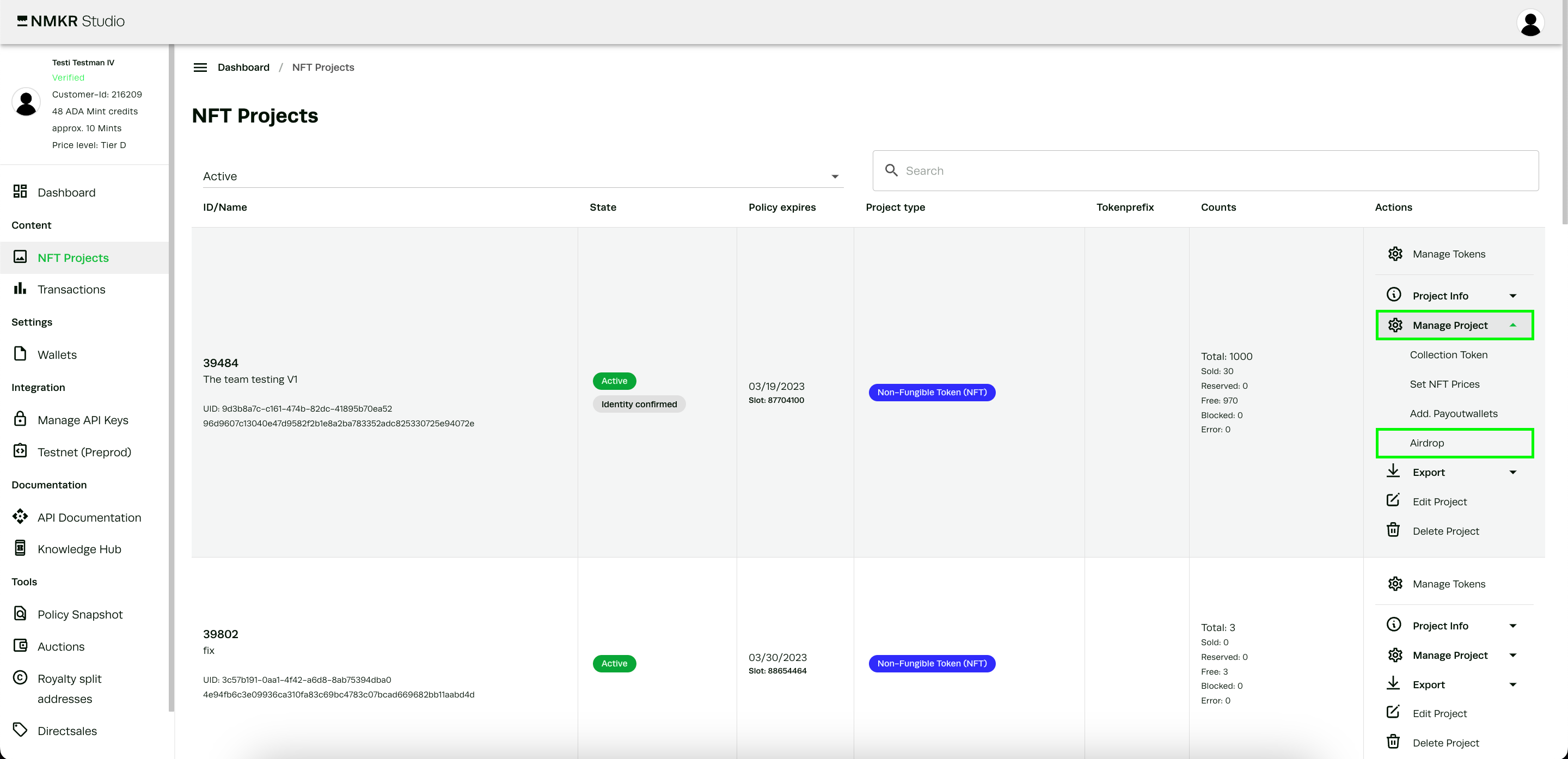
エアドロッパーは常に特定のプロジェクトのトークンを使用するため、エアドロッパーのボタンは各プロジェクトのアクションバーにあります。

<figure><img src="/files/r29Re89EBIz9QM9cY0sQ" alt=""><figcaption></figcaption></figure>

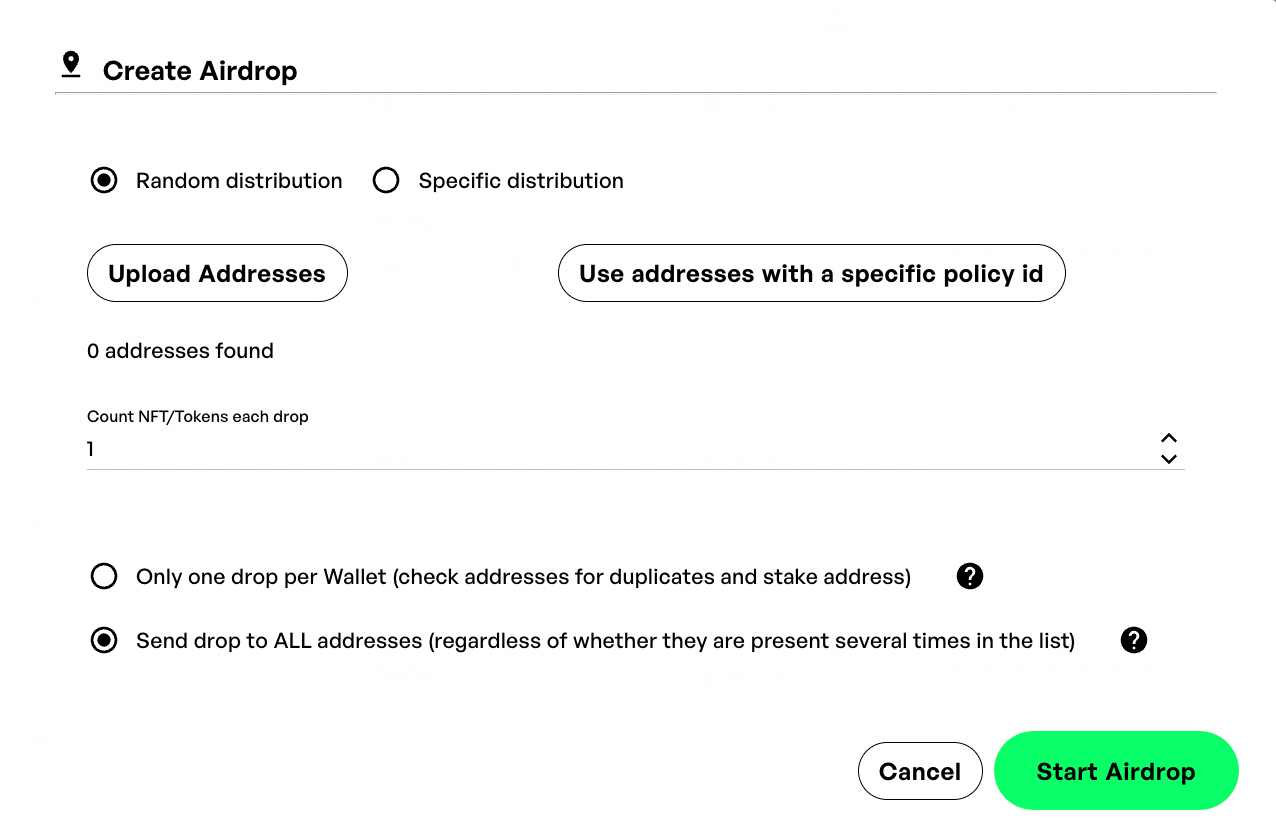
エアドロッパーのウィンドウが開き、その機能についての簡単な概要が表示されます。
<figure><img src="/files/9iuNAxIDRakhdzy2pMns" alt=""><figcaption><p>The airdropper tool in NMKR Studio</p></figcaption></figure>

#### 特定またはランダムなエアドロップ

エアドロップには2つの方法がある。ランダム配布と特定配布です。

[ランダム配布](https://docs.nmkr.io/nmkr-studio/minting/airdropper/airdrop-with-random-distribution)では、[特定のポリシーIDの](https://docs.nmkr.io/nmkr-studio/minting/airdropper#airdrop-to-holders-of-a-specific-policy-id)ホルダーにエアドロップするか、[アップロードされたアドレス](https://docs.nmkr.io/nmkr-studio/minting/airdropper#airdrop-with-address-list)リストにエアドロップすることができます。

[特定配布](https://docs.nmkr.io/nmkr-studio/minting/airdropper/airdrop-with-specific-distribution)では、csv.リストをアップロードできます。リストには、どのトークンをどのアドレスにどの量だけ送るかを正確に定義することができます。


---

# Agent Instructions: Querying This Documentation

If you need additional information that is not directly available in this page, you can query the documentation dynamically by asking a question.

Perform an HTTP GET request on the current page URL with the `ask` query parameter:

```
GET https://docs.nmkr.io/jp/nmkr-studio/minto/eadoropp.md?ask=<question>
```

The question should be specific, self-contained, and written in natural language.
The response will contain a direct answer to the question and relevant excerpts and sources from the documentation.

Use this mechanism when the answer is not explicitly present in the current page, you need clarification or additional context, or you want to retrieve related documentation sections.