> For the complete documentation index, see [llms.txt](https://docs.nmkr.io/llms.txt). Markdown versions of documentation pages are available by appending `.md` to page URLs; this page is available as [Markdown](https://docs.nmkr.io/nmkr-studio/multichain-projects.md).
# Multichain Projects
NMKR Studio supports multichain NFT minting, allowing you to create and manage projects that span multiple blockchains seamlessly. This feature enables creators to reach wider audiences while leveraging unique strengths of each chain. The core project setup workflow remains consistent across chains, but chain-specific configurations are required due to technical differences in how NFTs are minted and managed on each blockchain.
{% hint style="info" %}
All projects are set up off-chain. All configurations, including metadata templates, are defined before any on-chain actions. The project only becomes on-chain once a token is minted by you or a buyer directly via NMKR Pay.
{% endhint %}
#### Prerequisites
* You must have an operational wallet connected for each selected chain.
* Ensure you have sufficient mint coupons if you want to mint the collection token while set up.
#### Setting Up a Multichain Project
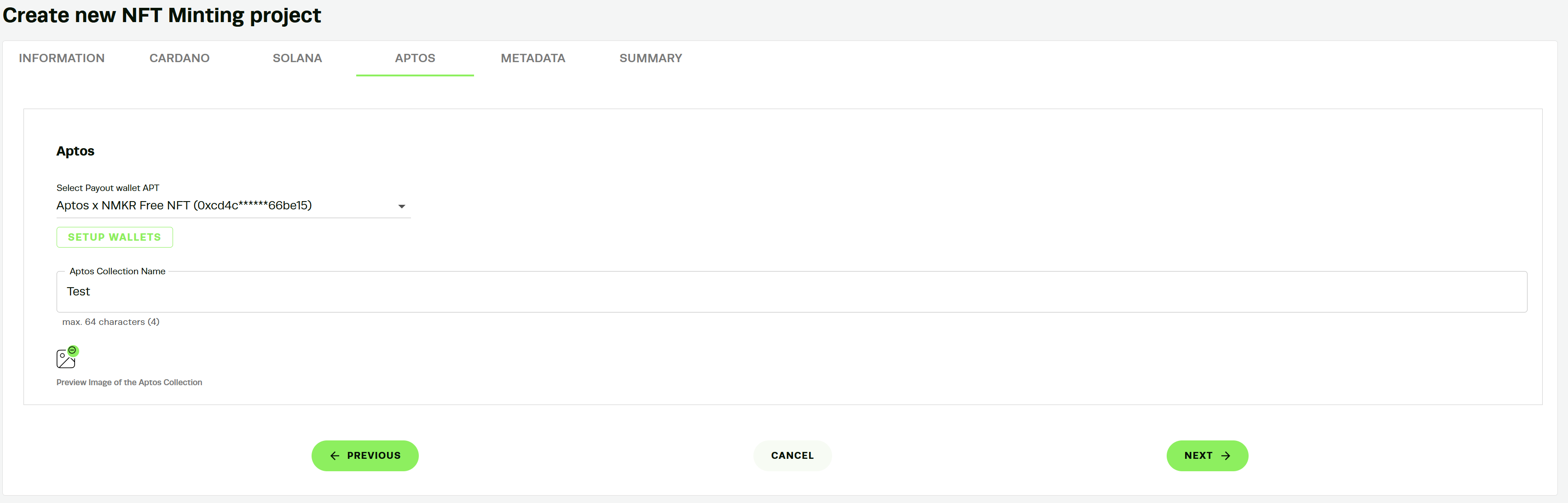
The project setup interface uses tabs (Information, Cardano, Solana, Aptos, Metadata, Summary) to guide you through the process. Start in the Information tab to define general project details, then proceed to chain-specific tabs based on your selections.
1. Select Blockchains: In the Information tab, check the boxes for Cardano, Solana, and/or Aptos. This enables the corresponding configuration tabs.
2. Configure General Project Details like Project Type: Choose Non-Fungible Token (NFT) or Fungible Token (FT). (FT currently available on Cardano-only projects.)
1. Project Name: Enter a name (min. 1 character, max. 64 characters).
2. Project Image (Thumbnail): Upload an image (size up to 300x100px; allowed filetypes: PNG, JPG).
3. Project URL: Optional URL for the project.
4. Description: Optional description (max. 255 characters).
5. Twitter Handle: Optional.
6. TokenName Prefix: Optional prefix for token names (max. 15 characters).
7. Storage Provider: IPFS (default).
8. Reservation Time: Set how long reservations are held (e.g., 20 minutes).
#### Chain-Specific Configurations:
1. Cardano:
1. CIP Standard: Select CIP-25 (or [CIP-68](/nmkr-studio/token/metadata/cip-68.md)).
2. [Policy](/nmkr-studio/project/policy.md): Choose New Policy (with optional policyscript lock) or Existing Policy.
2. Solana:
1. Solana Symbol: A short string identifier for the token (e.g., a ticker like "SYM"; max. 10 characters, optional). This is part of the Metaplex Token Metadata standard, used to represent the token's symbol in metadata. For details, see the[ Metaplex Token Metadata Overview](https://developers.metaplex.com/smart-contracts/token-metadata).
2. Solana Collection Family: A string to group related collections thematically (max. 64 characters, optional). This corresponds to the "family" field in the Metaplex metadata JSON under the "collection" object, allowing for thematic grouping of NFTs.
3. Create Verified Collection: Optional (costs 1 Mint Coupon to mint the Collection NFT). This mints a special NFT that acts as the collection parent, verifying member NFTs on-chain. A transaction is required on Solana, hence the coupon charge to cover fees.
3. Aptos:
1. Aptos Collection Name: Enter the name (max. 64 characters). This is a required field in the Aptos Digital Asset standard, defining the collection to which tokens belong. Collections provide a name and context for grouping NFTs.
2. Collection Image: Upload an image (no size or format restrictions specified, but use standard formats like PNG/JPG for compatibility). This corresponds to the URI field in the collection metadata, which can point to an image or other media for the collection. For official details on collections in the Aptos Token Standard, see the [Aptos Digital Asset Standard Documentation](https://aptos.dev/build/smart-contracts/digital-asset).
4. Metadata Tab: Define the standard 721 metadata structure.
1. Social Fields: Add optional fields like Twitter, Discord, Website, Telegram.
2. Static Fields: Add key-value pairs that are the same for all NFTs (e.g., Key: "Artist", Value: "Your Name").
3. Placeholder Fields: Define dynamic fields with placeholders (e.g., \)
4. Use the preview panel to see how metadata renders.
5. Summary Tab: Review all project details before proceeding.
#### How Multichain Linking Works
Multichain functionality is achieved by embedding policy IDs or reference token IDs from other chains into the asset's metadata. This links the NFTs across chains without enabling direct bridging or transfers. For example:
* In Real-World Asset (RWA) tokenization, a buyer selects their preferred chain (e.g., Solana) during purchase. The minted token includes identifiers from Cardano and Aptos policies/collections, preventing imitation or duplication on other chains.
* This ensures cross-chain recognition for display or verification purposes, but tokens remain native to their minted chain.
#### Creating Tokens
After project setup, create tokens within the project. This step is still off-chain. Chain-specific differences (e.g., metadata formats) are handled automatically based on your configurations. Tokens become on-chain only upon minting:
* Manually mint via the interface.
* or, set up sales and use NMKR Pay for sales on demand, where buyers trigger minting on their chosen chain.
#### Best Practices and Limitations
* Fees: Expect network fees per chain for minting. The Solana verified collection requires 1 Mint Coupon to cover the transaction for creating the Collection NFT.
* Test on Testnet First: Always use the Testnet (Preprod) environment to simulate multichain setups and minting processes before deploying to mainnet. This helps identify chain-specific issues without incurring real fees. Access it via the dashboard sidebar.
* Customization: For advanced needs, see our [API](https://docs.nmkr.io/api-reference) for endpoints.
* No Cross-Chain Bridging: Tokens are minted natively on each chain and cannot be directly transferred or bridged via NMKR Studio. Use external bridges if needed, but note potential risks.